 Zylcut
The editor
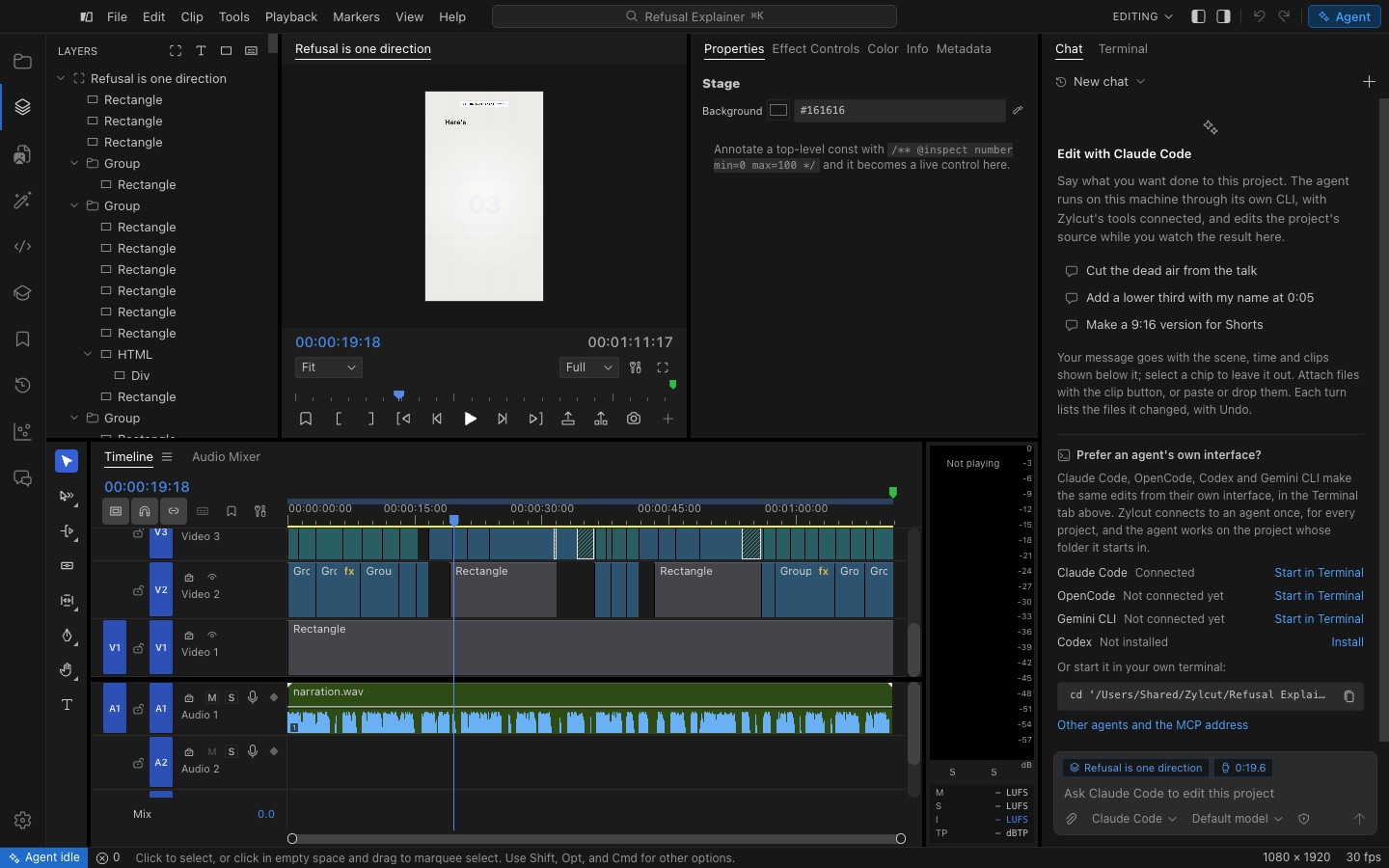
- Activity bar (far left) opens the left side bar’s panels: Layers, Project, Effects, Code, Script, Skills, Markers, History and Scopes.
- Program monitor plays the scene. The button at the right of its footer, or the ` key, maximizes it to fill the editor; Esc brings the layout back.
- Secondary side bar holds Properties, Effect Controls, Color, Info and Metadata.
- Agent dock at the right edge holds the chat and a terminal. The highlighted Agent button at the top right shows or hides it (⌃⌘I).
- Timeline at the bottom, with the Audio Mixer beside it and loudness meters on its right.
Workspaces
Section titled “Workspaces”Workspaces arrange the panels for a job: Editing (⌥⇧1), Assembly (⌥⇧2), Color (⌥⇧3), Effects (⌥⇧4) and Audio (⌥⇧5); on Windows and Linux use Alt and the digit. A workspace remembers changes you make to it until you choose Reset to Saved Layout (⌥⇧0).
Command search
Section titled “Command search”Command search (⌘K) finds any command or project by name, with its shortcut.