 Zylcut
What makes Zylcut different from other AI video editors
Most AI video editors put a model in the cloud between you and your footage: you upload, wait, and get back whatever the model decided. Zylcut works the other way round. The editor runs on your computer, and the AI is the coding agent you already have, such as Claude Code, Codex or Cursor. The agent drives Zylcut through more than 40 editing tools, and every change it makes is one you can see, adjust and undo.
- Bring your own AI. Zylcut adds no AI bill. It works with paid agents and with free or local models.
- Local first. Transcription, silence detection, footage search and export run on your machine. Nothing is uploaded unless you publish to YouTube yourself.
- A real editor, not a black box. The agent's cut lands on a multi-track timeline where you can trim, move and undo anything.
- The edit is a file. Your whole edit is one plain-text file,
index.tsx, so you can diff it, commit it and back it up like code.
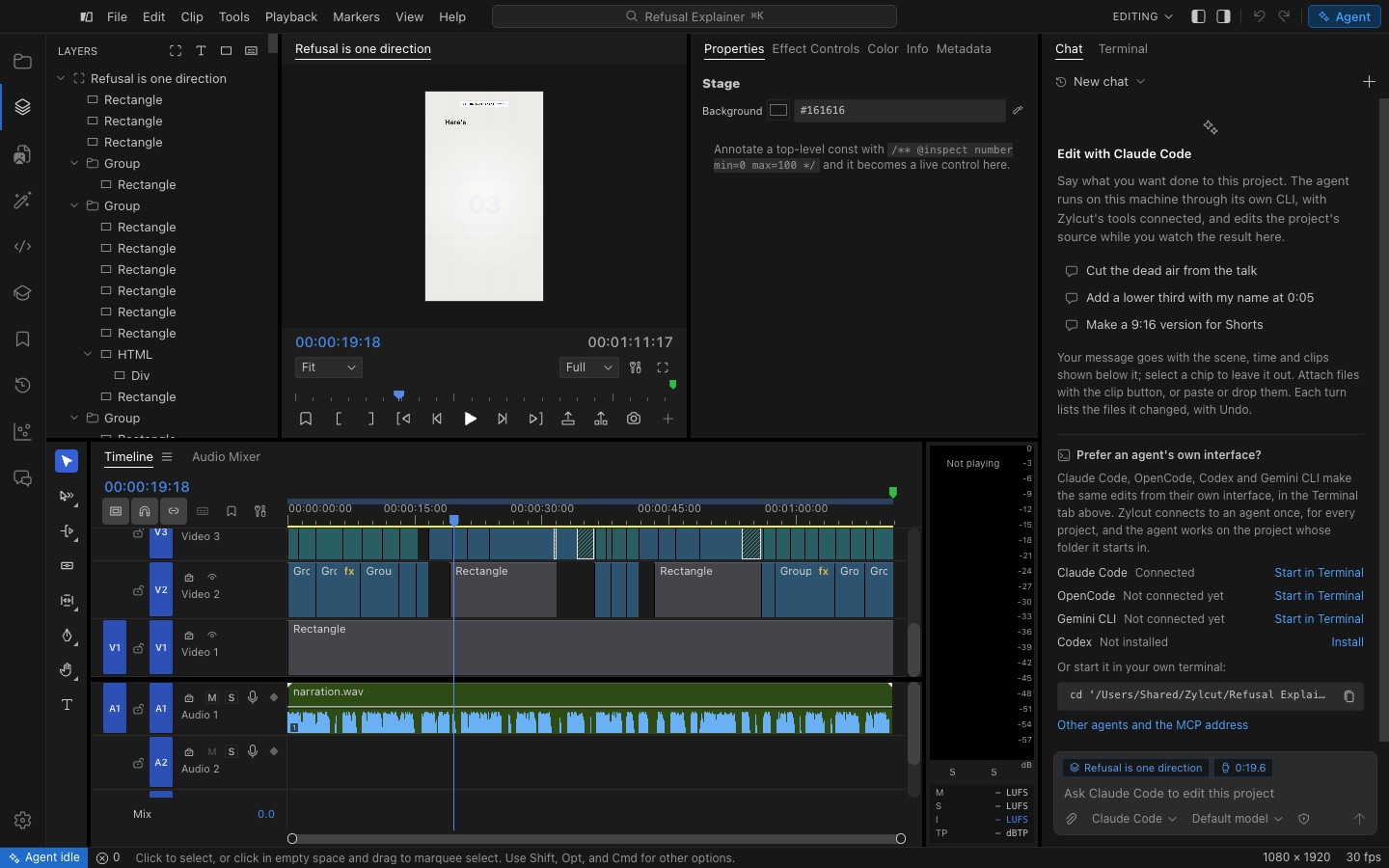
What your agent can do in Zylcut
Cut silences and dead air
The agent transcribes your recording locally with word-level timings and reads the waveform, so it finds every pause and cuts between words, never inside one. How silence removal works.
Caption every word
Captions are generated from the same word timings and drawn in one of seven styles, from a single word at a time to highlighted, word-by-word captions for Shorts and Reels. More on captions.
See, hear and check its own work
Before it says it is done, the agent renders real frames of the cut and looks at them, and it can check for black frames, broken media and timing problems. It can find moments in your footage by describing them, detect music beats, and tell speech from music and noise.
Sound, music and voice
It can clean up speech (de-noise, EQ and loudness), duck music under dialogue, add synthesized sound effects, and write a voiceover with a local voice or a cloud voice you connect.
Export and publish
Exports render frame by frame on your computer to MP4, MOV or WebM, with presets for YouTube, Shorts, Reels and TikTok. When the cut is done, publish it to your YouTube channel from the Export page.
How it works
- Install Zylcut for macOS, Windows or Linux and sign in with a free account.
- Connect your agent with one click in Settings > Agents. Claude Code, Codex, Cursor, VS Code, Antigravity, OpenCode, Gemini CLI, Windsurf and Claude Desktop are set up for you, and any other MCP agent takes one config entry.
- Ask for the cut. For example: "Remove the pauses from talk.mp4 and caption it in the spotlight style."
- Review and fine-tune on the timeline, then export or publish.
Prefer to stay in the app? The Agent panel runs Claude Code, Codex or OpenCode right next to your timeline. Working from the terminal instead? See editing video with Claude Code or connecting any MCP agent.
Who it is for
- Developers and founders making demos, launch videos and tutorials, who already live in a coding agent.
- Creators cutting talking-head videos, podcasts and short-form clips who want the tedious first pass done for them.
- Anyone who cares where their footage goes. It stays on your disk.
Questions
Is Zylcut really free?
Yes. Every feature is included, with no card, no trial, no watermark and no time limit. You need a free zylcut.com account, and the AI work runs on the coding agent you choose, under that agent's own plan.
Which AI does Zylcut use?
Yours. Zylcut does not ship its own model. Claude Code, Codex, Cursor, OpenCode and Gemini CLI connect with one command, and any other agent that speaks MCP works too, including ones running free or local models.
Does my footage get uploaded to an AI service?
No. Transcription, silence detection, footage search and export run on your computer. Your agent reads transcripts and still frames it asks for, not your video files, and those chats go to the agent's own service under its terms.
Can I edit without an agent?
Yes. Zylcut is a complete editor on its own, with a multi-track timeline, canvas, inspector, keyframes, effects, captions and export. The agent is there when you want it to do the tedious parts.
What can it export?
MP4, MOV and WebM with H.264, HEVC, AV1, VP9 or ProRes, plus presets for YouTube, Shorts, Reels and TikTok. You can also publish straight to your YouTube channel.
Which computers does it run on?
macOS on Apple silicon, Windows 10 and 11 (x64), and Linux as an AppImage or .deb.