 Zylcut
Set it up in one command
Install Zylcut, sign in with a free account, then connect Claude Code:
~/.local/bin/zylcut install claudeThis registers Zylcut's MCP server with Claude Code and copies two skills that teach it how to edit and how to read footage. Claude Code can start Zylcut itself when it needs it. To connect every agent on your machine at once, run ~/.local/bin/zylcut install all (on Windows, %LOCALAPPDATA%\Zylcut\bin\zylcut install all). The same buttons are in Settings > Agents, and Connect your agent has the steps by hand.
Ask for the cut
Open Claude Code anywhere and describe the edit in plain words:
claude "cut the pauses from talk.mp4 and caption it"Claude Code then works the way a careful editor would:
- Transcribes the recording on your computer, with a start and end time for every word.
- Finds the pauses in the transcript and the waveform, and cuts between words, never inside one.
- Edits the project, which is a plain-text file,
index.tsx. Each change is one undo step. - Renders frames and looks at them to check the captions and cuts before it tells you it is done.
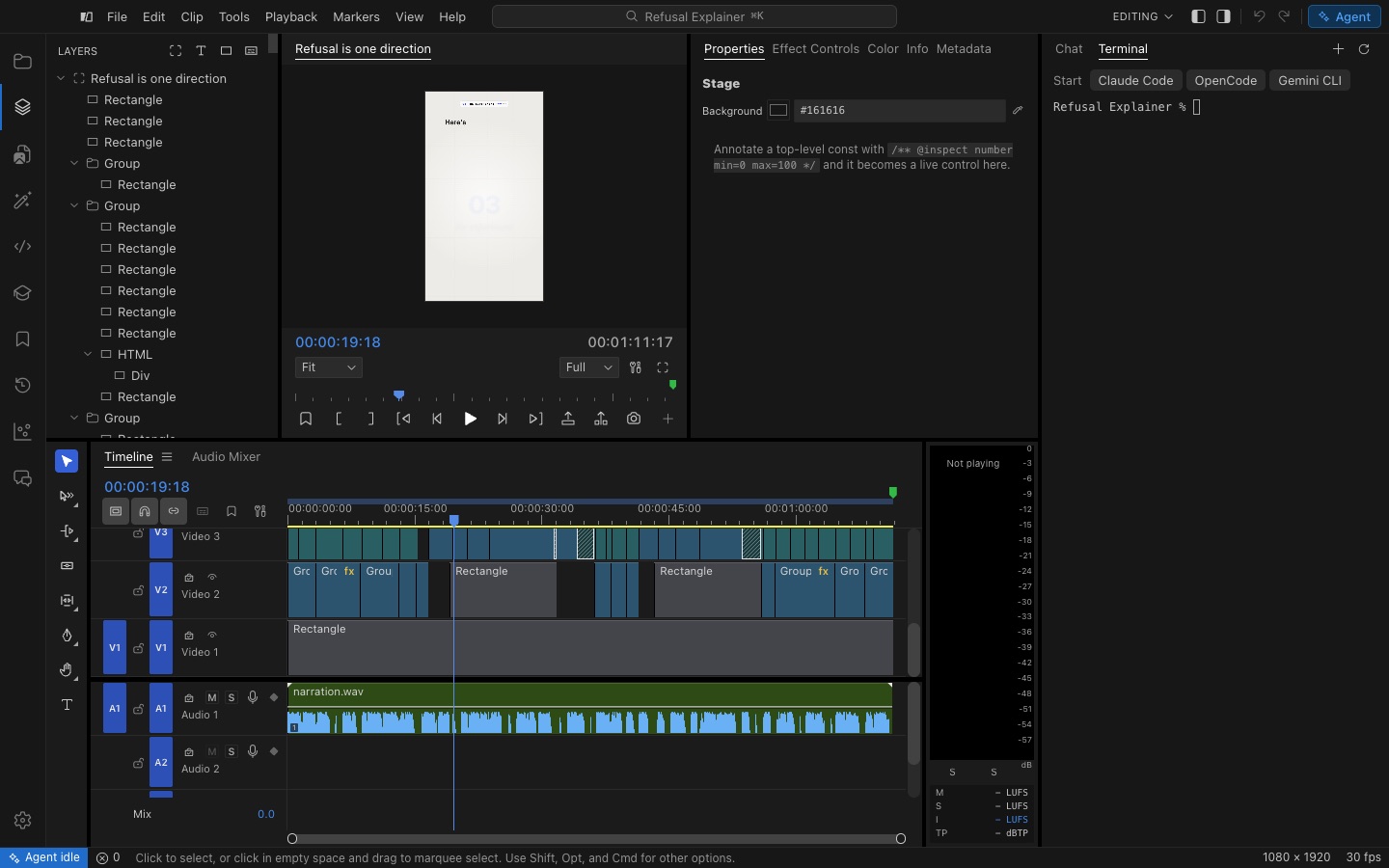
Then you take over
Everything Claude Code did is on Zylcut's timeline. Drag a clip, trim it, change a caption style or undo a step. When you drag a clip, Zylcut edits the same line of index.tsx that Claude Code edited, so there is never a second copy of your edit, and you can ask Claude Code for the next change right after.
Things to ask Claude Code
- "Remove the dead air and the retakes, keep the last take of each line."
- "Caption this in the punch style and make it vertical for Shorts."
- "Find the part where I show the dashboard and zoom in on it."
- "Add a music bed, duck it under my voice and cut on the beats."
- "Clean up the audio and export it with the YouTube 1080p preset."
Not using Claude Code?
Zylcut works the same way with Codex, Cursor, OpenCode and Gemini CLI, and with any other agent that supports MCP, including ones running free models. See Zylcut as an MCP server, or start with the overview of Zylcut as an AI video editor.
Questions
Can Claude Code edit videos?
Yes, with Zylcut. Claude Code cannot open a video file on its own, but once Zylcut is connected it gets real editing tools: it can transcribe footage, find pauses, cut, caption, look at rendered frames and export, all on your computer.
How do I connect Claude Code to Zylcut?
Install and open Zylcut, then press Connect next to Claude Code in Settings > Agents, or run ~/.local/bin/zylcut install claude in a terminal. It registers Zylcut's MCP server with Claude Code and copies Zylcut's editing skills.
Does it cost extra on top of my Claude plan?
No. Zylcut is free. The AI work runs on your own Claude Code plan, the same as any other task you give it.
Does it work with Codex, Cursor and other agents?
Yes. Codex, Cursor, OpenCode and Gemini CLI connect the same way, and any agent that speaks MCP can use Zylcut's tools.
Is my video sent to Anthropic?
Your video files are not. Transcription and rendering run on your computer. Claude Code reads the transcripts and the still frames it asks for, and those go to Anthropic as part of your chat, under Claude Code's terms.
Do I have to use the terminal?
No. Zylcut's Agent panel runs Claude Code right next to the timeline and shows every tool it calls, so you can ask for changes without leaving the app.